
FontAgent® supports the system-wide auto-activation functionality in macOS. Applications that use standard masOS font calls can automatically activate fonts resident in FontAgent automatically.
Auto-Activating Fonts in Adobe Apps
Adobe applications use proprietary technology for requesting fonts from macOS. To deliver font auto-activation functionality in Adobe apps, Insider provides plugins that you can install the plug-ins with a few clicks.
Resolving Auto-Activation Font Conflicts
When auto-activating fonts in your Mac apps, you can ask FontAgent to use its Conflict Resolver to help you select among multiple fonts that match fonts used in your document.
Setting Auto-Activation Preferences
You can use the FontAgent Preferences panel to control how FontAgent auto-activates fonts by following these steps.
- Select Preferences from the FontAgent menu to display the Preferences panel.
- Click the Activator tab.
- Use the checkboxes at the top of the panel to fine-tune auto-activation.
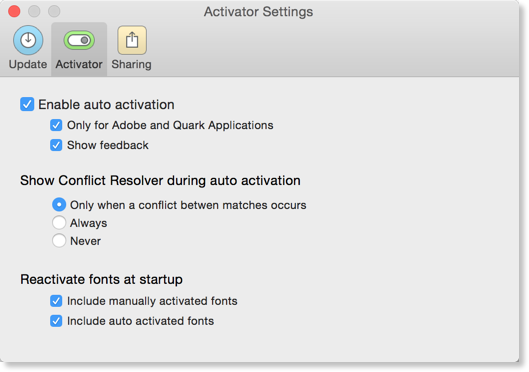
Enable auto-activation
Check this box to enable auto-activation in FontAgent.
Only for Adobe applications
Check this box to tell FontAgent to auto-activate fonts only in Adobe apps, and no other applications.
Show feedback
Display Mac pop-up alerts when FontAgent activates and deactivates fonts.
Some applications update their Font menus as they run, so newly activated fonts appear automatically after a short delay. Other apps load their list of available fonts as they start, so you must relaunch the apps for their Font menus to show newly activated fonts.